
Launching into a new era for Visual Studio
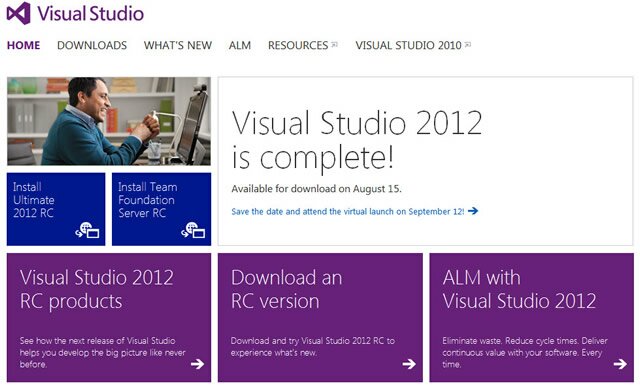
On August 15, 2012 at 10AM Pacific Time, Microsoft announced that MSDN subscribers can download and install Visual Studio 2012.
While Visual Studio 2012 will reach the RTW on August 15, Microsoft will hold a virtual launch event for Visual Studio 2012 on September 12, 2012 from Seattle, WA.
Yow wazzup guys it’s me, ron. So right now, I just want to share with you the newest developer tool Microsoft has just recently released for MSDN subscribers.
For non-MSDN subscribers, .. get one! haha! anyhow, I’ve been receiving a lot of questions regarding this release.. I’ve listed top questions below.. it’s more of like FAQs.. so.. here are my answers 🙂
1. What’s new in Visual Studio 2012?
Visual Studio 2012 includes a lot of updates to simplify development experience, promote team collaboration – and doing it effectively of course 🙂 and reach out and delight end-users across a variety of devices.
2. There has been some changes to the Visual Studio SKUs, what is the current line up?
Yes, there has been a lot of feature that was shuffled within different SKUs. Like for instance, the Microsoft Test Manager is now available in Premium, which was a part of Ultimate and Test Professional. Here are the SKUs for Visual Studio 2012:
– Visual Studio 2012 Ultimate
– Visual Studio 2012 Premium
– Visual Studio 2012 Professional
– Visual Studio Team Foundation Server 2012
– Visual Studio Test Professional 2012
Express SKUs have also been simplified so developers can focus more on the latest Microsoft platforms.
– Visual Studio 2012 Express for Web
– Visual Studio 2012 Express for Windows 8
– Visual Studio Team Foundation Server Express 2012
3. What is Application Lifecycle Management (ALM)?
Application Lifecycle Management (ALM) is very different from what we call SDLC or Software Development Life Cycle. These two are different stuff. SDLC only revolves on the development process, whereas ALM revolves on the whole entire cycle. ALM integrates different teams, platforms, and activities, enabling a continuous flow of business value.
4. We have a heterogeneous development environment, how do these tools help me?
With Team Explorer Everywhere, you can take advantage of Visual Studio even with non-Microsoft technologies including Java and Eclipse
5. What is the difference between Team Foundation Server and Team Foundation Service?
They both play central role in the Microsoft ALM story. They are like the backbone of the whole thing. The server is an on-premise solution, while the service is a cloud hosted solution. Team Foundation Service is also in a preview stage so it is subject to change before the release
6. How does Windows 8 development differ from developing for Windows 7?
You can develop desktop apps for Windows 8 with the same technologies that are used for Windows 7. However, what’s cool is that you can also develop Windows Store Apps for use on Windows 8 using your choice of .NET, C++, or HTML5 with JavaScript.
7. Is Silverlight no longer supported?
Silverlight has a 10 year mainstream support lifecycle. Microsoft will continue to provide feature updates; bug fixes and security updates for Silverlight
So yeah, a lot to keep in mind right? should you have any more questions, just comment below, and I’ll try my best to answer it 🙂
Have you downloaded Visual Studio 2012 already? how was it so far?
Hi Guyz! Free Microsoft Software!
Are you a CS/IT College Student? Do you want to have Free Microsoft Software? You’ve come to the right place! read further to learn what Microsoft has to offer JUST FOR YOU!
zup guyz it’s me ron and am here to share some services Microsoft has to offer just for you! Microsoft Software Licenses may be included to your Christmas List for this season and you can get them FOR FREE!
well, being a typical student just like you, I’m open to downloading or even buying some pirated software. why? well because as a student, i do not have much money to buy some expensive licenses! my allowance can’t handle that much amount! i believe that you are experiencing the same thing too right? well, Microsoft has heard of us! with this idea, Microsoft is now giving away Licenses just for us college students!
with that in mind, i would like to share to you 2 services. the MSDNAA which stands for “Microsoft Developer Network Academic Alliance” and the Dreamspark.


What is MSDNAA? well, MSDNAA is the easiest and most inexpensive way for students and faculty in the technology and design fields to get the latest Microsoft Software they need.
Microsoft Software such as the ever popular Windows 7 Operating System, Developer tools, Platform tools, and Design tools. There are so many software to choose from! from Visual Studio 2010 to Expression Studio, and many many more!!
MSDNAA is also available even in other countries. here in the Philippines, MSDNAA is now been given to CS/IT College students! did you know that? i didn’t know that until when i was in 3rd year. i wish i could have known that earlier. well, now that you know, what are you waiting for??!? go talk to your Network Administrator or Microsoft Student Partner 🙂
now for the Dreamspark.. if your school doesn’t have an MSDN Subscription, you can go to Dreamspark! Dreamspark offers Developer and Design tools just for you!!!
wanna learn more bout Dreamspark? one of my co-MSP created a blog about it. a shoutout to Patrick Torres ! \m/ You can view his blog here

Image by http://msacadph.wordpress.com
all these are offered and supervised by Ms. Mellie Valimento, our “Mama Boss” hehe you can just click MsAcadPh blog for more info 🙂 check it everyday for updates!!
so there you have it! have a Merry Christmas everybody!!
Visit MSDNAA here for more info
Visit Dreamspark here for more info
Visit MsAcadPh here for more info 😀
trivia bout the title: we used to say that in y4it, we keep on shouting “hi guyz! free Microsoft Software!!” to students haha!!

 Exatron