
Prepping your machine | Win8 Dev Fundamentals Launch
Download Notepad so you can start developing Windows Store Apps… Or, you can also download Notepad++ so you can see colors around the screen…
You’re kidding me right?
Yow whats up guys it’s me, ron, so we’re going to discuss tools today, and help you set up so you can start making those imaginary apps of yours
Of course, I’m kidding, if you can develop Windows Store Apps using Notepad, then please do share it to us, and I’ll give you one biiiig star.
Anyways, so, you’ve finally decided to make apps, but you don’t know where to start. Good timing! I’m starting this series called “Windows 8 Development Fundamentals” which I’ll be posting every week, so you might want to go back here again for new posts. Sooo since everything is in place, let’s get started!
1. Download Windows 8. If you’re an MSDN subscriber, then, I’m assuming you’re running Windows 8 already so, high five! For those who aren’t running Windows 8 yet, you can download the windows 8 evaluation version by clicking this link which will navigate you to Windows 8 evaluation for developers. Note that this version will expire and you cannot upgrade unless you buy it. According to an MVP, there’s a way for you to upgrade to Windows from evaluation version without reverting and reinstalling, in which can be done by running a script.. but let’s not complicate things, the point here is that you shall be running Windows 8 for you to create apps on it.
2. Download Visual Studio. Download Visual Studio by clicking this link by Downloading this, you’re installing Visual Studio, which is the IDE where you do a lot of your coding. And also Blend for Visual Studio. Blend was a part of the Expression Suite before, which Microsoft is retiring – you can see the announcement here, that’s why it’s now called simply “Blend”. As what the name sounds, this is where you express your artistic side. You can do animations from here, and you can also do graphic designs, page transitions, etc. Basically, this tool will make your application more appealing.
3. Get Developer License. Microsoft really loves licensing. But when we talk about license, we often mistakably think, it always involve money. Well, not in this case! getting a developer License is free, once you run your Visual Studio Express for Windows 8 which you downloaded earlier (in #2) When Visual Studio prompts you, follow the prompt to get your license. You can also get your license without running Visual Studio by following the steps in this link.
aaaand Alright! you’re all set! I’ll see you on the next post!
Launching into a new era for Visual Studio
On August 15, 2012 at 10AM Pacific Time, Microsoft announced that MSDN subscribers can download and install Visual Studio 2012.
While Visual Studio 2012 will reach the RTW on August 15, Microsoft will hold a virtual launch event for Visual Studio 2012 on September 12, 2012 from Seattle, WA.
Yow wazzup guys it’s me, ron. So right now, I just want to share with you the newest developer tool Microsoft has just recently released for MSDN subscribers.
For non-MSDN subscribers, .. get one! haha! anyhow, I’ve been receiving a lot of questions regarding this release.. I’ve listed top questions below.. it’s more of like FAQs.. so.. here are my answers 🙂
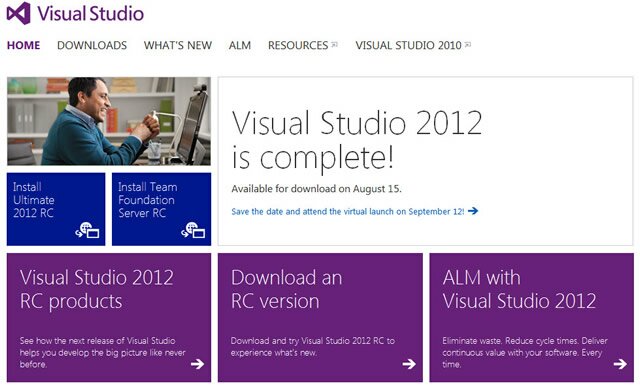
1. What’s new in Visual Studio 2012?
Visual Studio 2012 includes a lot of updates to simplify development experience, promote team collaboration – and doing it effectively of course 🙂 and reach out and delight end-users across a variety of devices.
2. There has been some changes to the Visual Studio SKUs, what is the current line up?
Yes, there has been a lot of feature that was shuffled within different SKUs. Like for instance, the Microsoft Test Manager is now available in Premium, which was a part of Ultimate and Test Professional. Here are the SKUs for Visual Studio 2012:
– Visual Studio 2012 Ultimate
– Visual Studio 2012 Premium
– Visual Studio 2012 Professional
– Visual Studio Team Foundation Server 2012
– Visual Studio Test Professional 2012
Express SKUs have also been simplified so developers can focus more on the latest Microsoft platforms.
– Visual Studio 2012 Express for Web
– Visual Studio 2012 Express for Windows 8
– Visual Studio Team Foundation Server Express 2012
3. What is Application Lifecycle Management (ALM)?
Application Lifecycle Management (ALM) is very different from what we call SDLC or Software Development Life Cycle. These two are different stuff. SDLC only revolves on the development process, whereas ALM revolves on the whole entire cycle. ALM integrates different teams, platforms, and activities, enabling a continuous flow of business value.
4. We have a heterogeneous development environment, how do these tools help me?
With Team Explorer Everywhere, you can take advantage of Visual Studio even with non-Microsoft technologies including Java and Eclipse
5. What is the difference between Team Foundation Server and Team Foundation Service?
They both play central role in the Microsoft ALM story. They are like the backbone of the whole thing. The server is an on-premise solution, while the service is a cloud hosted solution. Team Foundation Service is also in a preview stage so it is subject to change before the release
6. How does Windows 8 development differ from developing for Windows 7?
You can develop desktop apps for Windows 8 with the same technologies that are used for Windows 7. However, what’s cool is that you can also develop Windows Store Apps for use on Windows 8 using your choice of .NET, C++, or HTML5 with JavaScript.
7. Is Silverlight no longer supported?
Silverlight has a 10 year mainstream support lifecycle. Microsoft will continue to provide feature updates; bug fixes and security updates for Silverlight
So yeah, a lot to keep in mind right? should you have any more questions, just comment below, and I’ll try my best to answer it 🙂
Have you downloaded Visual Studio 2012 already? how was it so far?
Putting VB6-feet under
you wazzup guys, it’s me, ron, so now, we are going to talk about how do we put VB6, 6 feet under?
yes, we all know that VB6 became popular in the mid 1998. it’s real good! – in 1998. we’re now living in a new era where innovation is rapidly growing. if you are in VB6, you won’t be able to utilize modern Application Lifecycle Management. your number of cancelled projects will keep on growing if you don’t look and analyze what’s wrong with your process.
here’s a video of a workshop I got from msdnphilippines.net that can hopefully help you out in porting your applications from VB6 to VB.NET.
The goal of this workshop is to provide Microsoft Visual Basic developers with the knowledge and skills needed to develop Microsoft .NET-based applications by using Visual Basic .NET. Visual Basic .NET is a significant upgrade to Visual Basic and incorporates many new features and framework goals to the .NET architecture. These changes will allow Visual Basic developers to create enterprise applications or the .NET Platform and to create more traditional Visual Basic applications that can take advantage of the enhancements to the language
-msdnphilippines.net
Got you hanging, did I? that’s because this is actually a video series which you can view here.
It also covers a little bit of LightSwitch, so if you go through all of the videos, you will also learn more about how LightSwitch can help you out in developing a simple software
Till next time!
Fostering Innovation


yow wazzup guyz, it’s me, ron and I’m here to share a bit of my experience in Microsoft’s software factory, the Microsoft Innovation Center (MIC)
As part of my internship with Microsoft, i was given a task to be the MIC Officer-In-Charge in parallel to Victor Tanedo (shoutout to Vivi!). I also Project Manage Windows Phone 7 and Windows 8 software applications developed by MIC to different clients.
We’ve been doing a number of projects concentrating on different Microsoft technologies and i believe we’ve got lots and lots of projects ahead of us. Can’t it be more exciting than this!?
The Birth of the Alliance between Nokia and Microsoft

You thought Nokia FAILED to propel its handsets back to the limelight? think again!

Yow wazzup guyz it’s me, ron and I’m here to talk about the birth of the alliance between Nokia and Microsoft.
We all know that Nokia is having a sweet deal with Microsoft’s mobile operating system, the Windows Phone 7. Months have passed and Nokia’s version of Windows phone 7 has already been released! These sweet phones are named Nokia Lumia 710 and Nokia Lumia 800.
Here is a short clip of Nokia Lumia 800
Think that’s enough? Nokia is producing an array of models just for WP7! Here’s a video of the soon-to-come Nokia Windows Phone 7:
The marketshare of Windows Phone 7 these past months was just 1.6% because the operating system has been hampered by pricey handsets from Samsung and HTC. Windows Phone 7 unlike any other mobile operating systems is running on different hardware providers namely HTC, Samsung, LG and now, Nokia. Microsoft is focusing on creating innovative software since then and didn’t focus on hardware. They’ve tried but really the call of Microsoft is on software. This is one reason why they stopped selling Zune and just integrated the software to Windows Phone 7.
We all know that Nokia is producing countless number of smartphones a day and sells outrageously most in the part of Asia which is surprisingly cheaper than any other smart phones. With this in mind, I have a very high feeling that Nokia will produce less expensive Windows Phone 7 to its consumers. Once Nokia WP7 is fully blown, it will finally turn the tables around.
This is just the beginning of Nokia’s WP7 handsets. Even the existence of WP7 in the mobile industry has just geared up. Many hardware providers have produced a lineup of handsets with different price range which will then be released this holiday season.
Watch out for these:
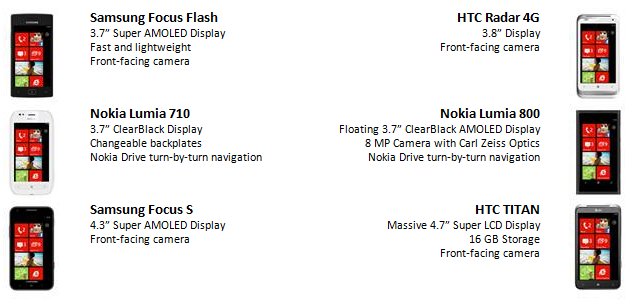
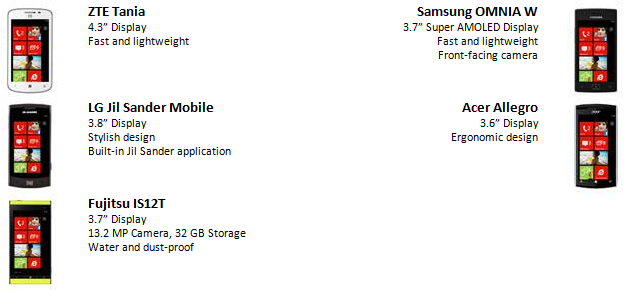
The best is yet to come.
Windows 8 Tablet User Interface REVEALED!

after 2 years of reengineering of Windows 7, Microsoft finally revealed the next generation Operating System, Windows 8!!

yow wazzup guyz, it’s me, ron and im here to give yo guyz a closer look at Windows 8.
this is such a big big news for the consumers since Windows 8 comes with its brand new look and a lot of great functionalities.
here is a post that i read a while ago from Windows8Beta.com:
Steven Sinofsky has finally revealed the new Windows 8 tablet UI at D9, which is very much like the Windows Phone 7 or the Zune interface. Microsoft has also announced for the first time that the next version of Windows is at present internally called as Windows 8. According to All Things Digital Windows 8 essentially supports two kinds of applications. One is the classic Windows application, which runs in a desktop very similar to the Windows 7 desktop.The other type of application, which has to be written in HTML5 and Javascript, looks more like a mobile application, filling the full screen. Internet Explorer 10, which is part of Windows 8, has already been configured to run in this mode, as have several widget-like apps for checking stock prices and weather
The start screen pretty much confirms the upcoming Windows Store and all the apps would be downloaded via it. Sinofsky further clarified that Windows 8 would have Internet Explorer 10 by default which we have mentioned earlier.
The company has posted few aspects of the new interface which was shown today at D9:
■Fast launching of apps from a tile-based Start screen, which replaces the Windows Start menu with a customizable, scalable full-screen view of apps.
■Live tiles with notifications, showing always up-to-date information from your apps.
■Fluid, natural switching between running apps.
■Convenient ability to snap and resize an app to the side of the screen, so you can really multitask using the capabilities of Windows.
■Web-connected and Web-powered apps built using HTML5 and JavaScript that have access to the full power of the PC.
■Fully touch-optimized browsing, with all the power of hardware-accelerated Internet Explorer 10
here is a short video showing the brand new User Interface of Windows 8:
and here is a link of the video of Windows 8 prototypes 😀 <it’s so new, this video is not available to *popular* video hosting sites yet hahaha>
you can also visit Microsoft.com for more info.
so, here are my thoughts about it 😀
first of all, yes! the UI is so cool! but it is not that cool for a mouse/touch pad user like me haha i dont have a tablet pc yet.. good thing there is a mode that i can turn back to the classic mode which is very similar to Windows 7 🙂 hahaha but on a second thought, with a lot of practice and experience, i guess a mouse/touch pad can get through it :D. Last of all, windows 8 is good if you have data with you all the time 🙂 that’s a plus! since you will see all of your updates with just one glimpse 🙂 if you dont have internet connection.. too bad!! hahaha 😀
so guyz, what are your thoughts? 😀
DEMO EXPO: MSPs on the LOOSE
16 chosen MSPs, 13 different destinations all around the Philippines, 1 whole month of fun and excitement….
DEMO EXPO: MSPs on the LOOSE!!

yow wazzup guyz, its me, ron and im here to give you a ground breaking news, fresh from Microsoft Philippines 🙂
In partnership with Acer, Microsoft Philippines will be sending out 16 MSPs to evangelize Windows Live Essentials to 13 different destinations in Luzon, Visayas and Mindanao. The specified event is entitled, Windows Live DEMO EXPO.
One of the objectives of this event is to drive traffic to the Acer Dream Concept Stores – 7 in Metro Manila, 1 in Tarlac, 3 in Visayas, and 2 in Mindanao. The event is also expected to increase the sales of the participating Acer laptops pre-installed with Windows 7 and of course to promote Microsoft’s Free Software and the benefit that Windows Live Essentials lets you do more with your laptop.
Microsoft will also be giving out a FREE laptop bag once you attend a FREE 20-minute demonstration delivered by the MSPs. it’s that simple, you already got a laptop bag! The demo attendees will be taught how to use Windows 7 and Windows live Essentials. These come pre-installed with every purchase of participating Acer laptops.
In addition, Windows Live Movie Maker will be highlighted in the demo cuz there will be a video contest for those who will buy an Acer Laptop. Microsoft will be giving out a Video camera for the 1st placer, Digital camera for the 2nd placer and a cool Headset for the 3rd placer. but wait, there’s more! 😀 Microsoft will also be giving out 10 consolation prizes (Microsoft premium items) 😀
the 16 MSPs will be deployed to 13 different areas all around the Philippines to reach out the targeted audiences..

this is such a breakthrough for us since we are finally going to face the end users.. we’ve got to prepare for this and make this event a successful one \m/ oh yeah!
Tune in with Zune

yow wazzup guyz it’s me, ron and im here to show you Microsoft’s MP3 player, Zune. yes. you’ve heard it right!.. no wait.. you’ve read it right…. Microsoft has their own music player!! i’ve never imagined that i will be able to see one sice, unfortunately, Zune is not popular here in the Philippines. that is because it is not available for sale here. it is available in other countries so if you wanna buy one, and you’re here in the Philippines, then you should just buy it online.
what is Zune?
Zune is a portable entertainment platform wherein you can listen to your music, watch videos or play games on the go. you can also listen to radio, view pictures and many more. another feature that i like about Zune is that you can actually send an MP3 file to other Zunes. ain’t it cool?
i recorded a quick video of it to show you guyz. i’m with Rudolph Antonio, Daryl Silao and Ms. Mellie Valimento so.. i would just like to give a shouout to them.. hi guyz!! there… so, yeah, as i was saying, i recorded a video of it and by the way, this Zune player is ms. Mellie’s so yeah, thanks for letting us borrow it maam! orayt, so without further ado, here is a quick vid of it:
so what do you think of zune? leave a comment belowwww xD \m/
Microsoft Student Partners, on the LOOSE
yo wazzup guyz its me, ron and im here to share to you our experiences about the IT convention we attended last March 25, 2010 at the SM Megamall here in the Philippines as a Microsoft Exhibitor \m/
and so, the Microsoft Student Partners (MSP) here in the Philippines does a lot of cool stuff such as this:
haha a shoutout to Duchess Domagsang, Rober Jason Casanova, Daryl Silao, Cesar Cuaresma, Rudolph Antonio, Karen Cate Arabit
haha here is the last day of the affair:
IE9 sure is MINE: the FINALE!!!
make sure to watch this video blog, hope you guyz like it 🙂
it started with a VLOG and ended with a VLOG. witness the finale of IE9 sure is MINE!!!
yow wazzup guyz its me, ron.. and welcome to the finale of IE9 sure is MINE!!! i have something to announce to you guyz.. so if you may, play the video below righhhhht now xD \m/

Click here to Download IE9 Final Version
Click here to Play Master of the Web and get a chance to win COOL prizes!
Internet Explorer 9 Update 5.0 – the IE9 RTW!!!
The final version of IE9 will be released on March 15, 2011 in the Philippines!
IE9 marks its history in being the most downloaded beta version software of all time!
yow wazzup guyz its me, ron and im here to give you a lil update bout Internet Explorer 9 (IE9)

Exactly twelve months from the first Platform Preview of IE9, on Tuesday March 15th in the Philippines, March 14th in Austin Texas, we will celebrate the developers and the designers who are making a more beautiful web for all of us. IE9 final version will be released from download.
There are a lot of amazing things to share! like the website contest, web gaming and a whole lot more! Luck-IE9 team had a meeting last March 12 and believe me, i was in shock when i first heared the upcoming surprises brought upon by Microsoft here in the Philippines.!!. please stay tuned for more info – ill be posting a lot of stuff right here in my blog so make sure to stay updated every single day! 😀
and another thing, if you have the IE9 RC version, you will be automatically updated to IE9 Release-To-Web (RTW) version.
Are you ready for a more beautiful web? 😀 xD \m/
Resources: windowsteamblog
Internet Explorer 9 Update 4.0 – Final Release Automatic Update!!!
expected to be revealed, April this year… you saw it, you witnessed it, now the final version is coming near!
Yow wazzup guyz, its me ron, and im here to give you just a quick update for IE9.
Internet Explorer 9 (IE9) previous builds are just the start.. now that the Release Candidate (RC) is already out, the final release will be out SOON!
Microsoft will upgrade IE9 RC users to the final release automatically when they are available later this year.
not only that, those that are using IE9 Beta release will also be upgraded to IE9 RC.
Microsoft announced earlier this month that the beta version of IE9 has surpassed 20 million downloads ,making it the most downloaded beta release of Internet Explorer ever. this just means that Microsoft really is making a stance in the world of internet browsing. The download rate of IE9 beta has grown by 5 million each month since its release on September 15, 2010. Microsoft is expected to reveal the FINAL VERSION of IE9 this April.
another point to ponder is that once IE9 Final release is out, it also means that the development of HTML5 is coming near as well. im so excited to see the websites in the future. IE9 really is gonna unlock what’s next. 🙂 😀 wooo!
so what do you guyz think of the automatic update? leave a comment below and let your voices be heard! \m/ xD 😀
source:
Microsoft and Nokia: Epic Partnership
Microsoft teamed up with Nokia who outsells smartphones more than iOS + Android, COMBINED..
you wazzup guyz its me, ron and im here to talk about the connivance of Microsoft and Nokia.
will Nokia follow the footsteps of HTC, LG, and Samsung? lets find out.
I know all of you guyz there are using a cellular phone. and probably, at about 50% to 60% of you are Nokia users.
why did i came up with that idea? it is because Nokia is selling approximately 260,000 smartphones a day (not to mention the non-smartphone phones.. or whatever its called.. uhm.. regular phones? >.< ). and perhaps you may be one of them. imagine.. 260,000 a day.. 1,820,000 a week.. 7,800,000 a month.. 94,900,000 a year!! with that situation, Nokia is taking the Mobile industry by Storm!
and well, YES i just found out that Nokia really has an agreement to partner with Microsoft as its software provider. here is one mockup i saw at the internet of what Windows Phone 7 – Nokia will look like..

in summary here is what both parties agreed upon:
• Nokia will adopt Windows Phone as its primary smartphone strategy, innovating on top of the platform in areas such as imaging, where Nokia is a market leader.
• Nokia will help drive and define the future of Windows Phone. Nokia will contribute its expertise on hardware design, language support, and help bring Windows Phone to a larger range of price points, market segments and geographies.
• Nokia and Microsoft will closely collaborate on development, joint marketing initiatives and a shared development roadmap to align on the future evolution of mobile products.
• Bing will power Nokia’s search services across Nokia devices and services, giving customers access to Bing’s next generation search capabilities. Microsoft adCenter will provide search advertising services on Nokia’s line of devices and services.
• Nokia Maps will be a core part of Microsoft’s mapping services. For example, Maps would be integrated with Microsoft’s Bing search engine and adCenter advertising platform to form a unique local search and advertising experience.
• Nokia’s extensive operator billing agreements will make it easier for consumers to purchase Nokia Windows Phone services in countries where credit-card use is low.
• Microsoft development tools will be used to create applications to run on Nokia Windows Phones, allowing developers to easily leverage the ecosystem’s global reach.
• Microsoft will continue to invest in the development of Windows Phone and cloud services so customers can do more with their phone, across their work and personal lives.
• Nokia’s content and application store will be integrated with Microsoft Marketplace for a more compelling consumer experience.
source: www.nokia.com
i really can’t wait for the new Windows Phone 7 – Nokia. i really REALLY wish that Nokia is gonna low down the cost – so i can buy one, wahaha!
so what so you guyz think of the collaboration between the two companies? do you think their partnership will work out well in the market? leave a comment below and let your voices be heard! >.< 😀 \m/
references:
Internet Explorer 9 Update 3.0 – Release Candidate is OUT NOW!!!
yow wazzup guyz, its me, ron and im here to give you another update of Internet Explorer 9 (IE9)!!!
YES!!! YESS!!! Rumors REALLY do come true! 😉 😀
As what ive said before in my previous update, there are hearsays that there will be an IE9 Release Candidate (RC).. and now, it came into REALITY! 🙂
if you guyz have no background of what a software Release Candidate (RC) is, click this link for you to be redirected to my other post where i explained what an RC is 🙂
and without further ado, you can download IE9 RC here: http://ie.microsoft.com/testdrive/ to get your very own IE9 RC version 😀

just click the link and click the “Download RC Now” button and explore a more beautiful web!
I’m gonna try test this one out and prepare for another review of IE9 RC Version
thanks and see you guyz next time 😉
Checking Out Windows Phone 7

yow wazzup guyz its me ron and im here to give you a lil overview about Windows Phone 7
there are a million reasons why Windows Phone 7 is a must have phone in this day and age. Microsoft mobile operating system has been battered, bruised and badly lagging in the past years, and now is making a comeback. Windows Phone 7 is making a massive shift in mobile devices in this generation. It is Microsoft starting over with something fresh, hip and definitely something new as to what mobile devices have right now. it’s a very different kind of Microsoft product. this is the beginning of something truly great.
Windows Phone 7 comes with numerous features. allow me to enumerate the features i like most with Windows Phone 7.
1.) Microsoft Office on Windows Phone 7 looks INCREDIBLE!
Windows Phone 7 (WP7) is the most aggressively different, fresh approach to a phone interface. this is really something that i would buy since it will suit my needs. the feature i like most in WP7 is the ability to create a Microsoft Office file on the go. as a student, i edit a lot of documents. i can just create a Microsoft Word file, attach it to the email via Live Mail and send it to the librarian for it to be printed. and all i need is a WP7 and internet connection.

and oh, another thing, have you ever experienced waking up in a Sunday morning and you look into your phone and you see this document attached to an email wherein you need to edit it pronto? well, heres typically what you gotta do:
1. get up (2 mins)
2. open your computer (5 mins)
3. sign in to your mail (1 min)
4. download attachment (2 mins)
5. edit the document (10 mins)
6. attach and send the document (1 min)
7. shut down your computer and go back to sleep (2 mins)
for a total of 23 minutes. However, if you have WP7 as your handheld, this probably would have happend:
1. open attachment from phone (30 secs)
2. edit the document (10 mins)
3. send the document (30 secs)
4. lock the phone and go back to sleep (10 secs)
for a total of 11 minutes and 10 seconds. oh well, im just saying.. hahaha with WP7, you will be able to save your precious time as well.
2.) Introducing: the Live Tiles
Live Tiles in WP7 are amazing! it represents the shortcut icons you see at the homepage. since it is by Microsoft, it also inherits some fundamental functions of an icon at the ever popular Operating System, the Windows 7. in Windows 7, you can pin an icon to the task bar. same with the WP7. you can pin your favorite icons on your home page.
Another thing that i like about live tiles is that it uses animated icons. every animation runs smoothly, clean and simple. for instance, the Text Live Tile. it will change its icon to a smiley face if you have a text message. otherwise, if you do not receive a message for a couple of days, it will become a sad face. aint it great?! haha thats so cool!
You can even change the color of your Live Tiles depending on what color jives your mood.
3.)Multitasking
Of course, who would not want multitasking on their phone! specially if it is a smart phone, you need to at least implement multitasking as one of the main functions of your phone. now WP7 brilliantly made an algorithm in order to implement multitasking keeping in mind the available resources that comes with the phone since there is only a limited resources – e.g. the phone’s memory, storage, etc.
 So basically, Multitasking in WP7 saves lots and lots of memory. what WP7 does is that is pauses the running application and saves its state so it may be resumed later on when the user needs to open it again. it does not run in background, unlike any other phones out there that is consuming the precious CPU processing time.
you can use this functionality to get back to where you left in just a matter of seconds without actually knowing what happened 🙂
so there you have it, i only mentioned three of the cool new features of WP7. but behind all these cool new features is the price. WP7 price is expensive. i mean as a student like me, i wouldn’t be able to buy one. im limited to only buying inexpensive phones like Nokia – the one i use right now. but oh well, smart phones really costs that much nowadays.
Despite the price, WP7 is worth buying for. im planning to save money just to buy it cuz, cmon, all these cool features for a phone? the brilliant algorithms behind it and its sexy sleek look, it’s definitely worth a penny.
So what do you guyz think of the new WP7? leave a comment below!! let your voice be heard!! \m/ xD 😀 😉
Internet Explorer 9 Update 2.O – the new User Interface!!!
yow wazzup guyz, its me ron and im here for another internet explorer 9 update.
news about IE9 is EVERYWHERE! its a sign that IE9 really is coming near. today, i saw this blog post from http://www.winrumors.com and it says that IE9 is gonna sport a minor UI changes. look!!!

So what do you guyz think of the new User Interface (UI)? well in my opinion, both looks really beautiful but id rather choose the new one, the one at the top. for me, it looks more classy and clean. the new UI complements the address bar at the left ;). so for me, i like the new UI more. it looks appealing to me!! 😀
However, you cant please everyone. i think a better way to solve this problem is to have IE9 be customizable depending on the likes of the users. it’s always at the front end. if people dont like the user interface, no matter how good a certain program is, the user wont be able to try that specific program giving it less attention to the market. so the User Interface is really an important thing, a developer must consider in creating cutting edge programs
so what do you guys think of the new UI? 😉 😀 \m/
references:
winrumors: Internet Explorer 9 Release Candidate will Sport Minor UI changes
Internet Explorer 9 Update 1.O – the IE9 Release Candidate!!!
Yow wazzup guyz its me, ron and im here to give you an Internet Explorer 9 update!!!
and yes, its another VLOG.. hope you guyz like it.. xD watch me \m/
References:
Internet Explorer 9 Facebook Fanpage
Download Internet Explorer 9!!

just to add up, ill be updating you guyz whenever i got sum news about IE9. so get your heads up and stay tuned for more 😀
thanks again! cya guyz nxt tym 😉 \m/
Hi Guyz! Free Microsoft Software!
Are you a CS/IT College Student? Do you want to have Free Microsoft Software? You’ve come to the right place! read further to learn what Microsoft has to offer JUST FOR YOU!
zup guyz it’s me ron and am here to share some services Microsoft has to offer just for you! Microsoft Software Licenses may be included to your Christmas List for this season and you can get them FOR FREE!
well, being a typical student just like you, I’m open to downloading or even buying some pirated software. why? well because as a student, i do not have much money to buy some expensive licenses! my allowance can’t handle that much amount! i believe that you are experiencing the same thing too right? well, Microsoft has heard of us! with this idea, Microsoft is now giving away Licenses just for us college students!
with that in mind, i would like to share to you 2 services. the MSDNAA which stands for “Microsoft Developer Network Academic Alliance” and the Dreamspark.


What is MSDNAA? well, MSDNAA is the easiest and most inexpensive way for students and faculty in the technology and design fields to get the latest Microsoft Software they need.
Microsoft Software such as the ever popular Windows 7 Operating System, Developer tools, Platform tools, and Design tools. There are so many software to choose from! from Visual Studio 2010 to Expression Studio, and many many more!!
MSDNAA is also available even in other countries. here in the Philippines, MSDNAA is now been given to CS/IT College students! did you know that? i didn’t know that until when i was in 3rd year. i wish i could have known that earlier. well, now that you know, what are you waiting for??!? go talk to your Network Administrator or Microsoft Student Partner 🙂
now for the Dreamspark.. if your school doesn’t have an MSDN Subscription, you can go to Dreamspark! Dreamspark offers Developer and Design tools just for you!!!
wanna learn more bout Dreamspark? one of my co-MSP created a blog about it. a shoutout to Patrick Torres ! \m/ You can view his blog here

Image by http://msacadph.wordpress.com
all these are offered and supervised by Ms. Mellie Valimento, our “Mama Boss” hehe you can just click MsAcadPh blog for more info 🙂 check it everyday for updates!!
so there you have it! have a Merry Christmas everybody!!
Visit MSDNAA here for more info
Visit Dreamspark here for more info
Visit MsAcadPh here for more info 😀
trivia bout the title: we used to say that in y4it, we keep on shouting “hi guyz! free Microsoft Software!!” to students haha!!
Homemade Microsoft Surface!

This picture is not the HOMEMADE Microsoft Surface.. it is the REAL ONE!


Dynamayt!


Microsoft’s octoBURNfest is roaming the universities with the Microsoft Student Partners (MSP) to give out seminars and FREE Genuine Licenses of Microsoft Developer and Design Tools which includes the ever popular Windows7 Operating System \m/
iACADEMY MSPs together with JPCS iACADEMY a.k.a. “ayt!” formed an event called Dynamayt! some of you were thinking why Dynamayt!? instead of Dynamite? well, we would just like to include the name of our organization in the event title. haha! anyweiz, in this event, we planned to have a breakout session fit to the course of the attendees. The breakout includes Technopreneurship by Mr. Isaac Bulatao for Business Administration students, Ethical Hacking by Mr. Terrence Montanes for Software Engineering students, and Digital Painting by Martin Del Mundo for Digital Arts and Animation students. after the breakout session, the actual iACADEMY octoBURNfest takes place. this includes seminars given by Microsoft. the talks were MSDNAA/Imagine Cup by Ms. Mellie Valimento, Microsoft Motto: IT Career Enhancement by Mr. Cristopher Abary, Microsoft Expression Studio by Mr. Cesar Cuaresma and Microsoft Web Apps by Ms. Angela Garong.
Dynamayt! was a fun filled activity. this is the first Big Event of ayt! here at iACADEMY. a lot of effort has been made just to make this event possible. of course this event won’t be possible if not for the ayt! Officers and MSPs that visited us from other schools. well done guyz! take a look at some of the pics:

Here is a short clip of Ms. Mellie Valimento that i got for you guyz. i got this video right after her talk:
orayt! as what ive said earlier this event wont be possible if not for the people behind Dynamayt! thanks guyz for supporting this event, i hope that iACADEMY students learned a lot from this event. i hope that this will be their stepping stone for them to keep their fire burning for their future.. nyahahaha!!!

 Exatron
