
Launching into a new era for Visual Studio
On August 15, 2012 at 10AM Pacific Time, Microsoft announced that MSDN subscribers can download and install Visual Studio 2012.
While Visual Studio 2012 will reach the RTW on August 15, Microsoft will hold a virtual launch event for Visual Studio 2012 on September 12, 2012 from Seattle, WA.
Yow wazzup guys it’s me, ron. So right now, I just want to share with you the newest developer tool Microsoft has just recently released for MSDN subscribers.
For non-MSDN subscribers, .. get one! haha! anyhow, I’ve been receiving a lot of questions regarding this release.. I’ve listed top questions below.. it’s more of like FAQs.. so.. here are my answers 🙂
1. What’s new in Visual Studio 2012?
Visual Studio 2012 includes a lot of updates to simplify development experience, promote team collaboration – and doing it effectively of course 🙂 and reach out and delight end-users across a variety of devices.
2. There has been some changes to the Visual Studio SKUs, what is the current line up?
Yes, there has been a lot of feature that was shuffled within different SKUs. Like for instance, the Microsoft Test Manager is now available in Premium, which was a part of Ultimate and Test Professional. Here are the SKUs for Visual Studio 2012:
– Visual Studio 2012 Ultimate
– Visual Studio 2012 Premium
– Visual Studio 2012 Professional
– Visual Studio Team Foundation Server 2012
– Visual Studio Test Professional 2012
Express SKUs have also been simplified so developers can focus more on the latest Microsoft platforms.
– Visual Studio 2012 Express for Web
– Visual Studio 2012 Express for Windows 8
– Visual Studio Team Foundation Server Express 2012
3. What is Application Lifecycle Management (ALM)?
Application Lifecycle Management (ALM) is very different from what we call SDLC or Software Development Life Cycle. These two are different stuff. SDLC only revolves on the development process, whereas ALM revolves on the whole entire cycle. ALM integrates different teams, platforms, and activities, enabling a continuous flow of business value.
4. We have a heterogeneous development environment, how do these tools help me?
With Team Explorer Everywhere, you can take advantage of Visual Studio even with non-Microsoft technologies including Java and Eclipse
5. What is the difference between Team Foundation Server and Team Foundation Service?
They both play central role in the Microsoft ALM story. They are like the backbone of the whole thing. The server is an on-premise solution, while the service is a cloud hosted solution. Team Foundation Service is also in a preview stage so it is subject to change before the release
6. How does Windows 8 development differ from developing for Windows 7?
You can develop desktop apps for Windows 8 with the same technologies that are used for Windows 7. However, what’s cool is that you can also develop Windows Store Apps for use on Windows 8 using your choice of .NET, C++, or HTML5 with JavaScript.
7. Is Silverlight no longer supported?
Silverlight has a 10 year mainstream support lifecycle. Microsoft will continue to provide feature updates; bug fixes and security updates for Silverlight
So yeah, a lot to keep in mind right? should you have any more questions, just comment below, and I’ll try my best to answer it 🙂
Have you downloaded Visual Studio 2012 already? how was it so far?
Putting VB6-feet under
you wazzup guys, it’s me, ron, so now, we are going to talk about how do we put VB6, 6 feet under?
yes, we all know that VB6 became popular in the mid 1998. it’s real good! – in 1998. we’re now living in a new era where innovation is rapidly growing. if you are in VB6, you won’t be able to utilize modern Application Lifecycle Management. your number of cancelled projects will keep on growing if you don’t look and analyze what’s wrong with your process.
here’s a video of a workshop I got from msdnphilippines.net that can hopefully help you out in porting your applications from VB6 to VB.NET.
The goal of this workshop is to provide Microsoft Visual Basic developers with the knowledge and skills needed to develop Microsoft .NET-based applications by using Visual Basic .NET. Visual Basic .NET is a significant upgrade to Visual Basic and incorporates many new features and framework goals to the .NET architecture. These changes will allow Visual Basic developers to create enterprise applications or the .NET Platform and to create more traditional Visual Basic applications that can take advantage of the enhancements to the language
-msdnphilippines.net
Got you hanging, did I? that’s because this is actually a video series which you can view here.
It also covers a little bit of LightSwitch, so if you go through all of the videos, you will also learn more about how LightSwitch can help you out in developing a simple software
Till next time!
Deciphering Gartner’s Magic Quadrant

yow wazzup guys, it’s me, ron so today, we are going to focus on Gartner’s Magic Quadrant for ALM.
ALM is now spreading which in turn makes software companies improve their efficiency in their development process as well as building and sustaining their engineering productivity.
As time goes on, a lot of developer tools and solutions are popping out – most of them are now in Agile/SCRUM.
Here are some of the leading Software Solutions that support ALM
Awesome, right? now, enough about ALM. Let’s now dive in to Gartner’s Magic Quadrant.
What are Magic Quadrants?
According to gartner.com:
Gartner Magic Quadrants are a culmination of research in a specific market, giving you a wide-angle view of the relative positions of the market’s competitors. By applying a graphical treatment and a uniform set of evaluation criteria, a Gartner Magic Quadrant quickly helps you digest how well technology providers are executing against their stated vision.
How Do Magic Quadrants Work?
According to gartner.com:
Magic Quadrants provide a graphical competitive positioning of four types of technology providers, where market growth is high and provider differentiation is distinct:
Leaders execute well against their current vision and are well positioned for tomorrow.
Visionaries understand where the market is going or have a vision for changing market rules, but do not yet execute well.
Niche Players focus successfully on a small segment, or are unfocused and do not out-innovate or outperform others.
Challengers execute well today or may dominate a large segment, but do not demonstrate an understanding of market direction.
Okay, so with that in mind, let’s now look into the Magic Quadrant for Application Lifecycle Management:

As mentioned, we have four (4) areas that we need to consider in deciphering the magic quadrant. We have the niche players, the visionaries, the challengers, and the leaders.
Niche Players:
- Micro Focus
- TechExcel
- Inflectra
- Rocket Software
These companies simply has the vision, and the ability to execute. But they tend to do it minimally, which in turn, other companies are outperforming them.
Visionaries:
- VersionOne
- PTC-MKS
- Serena Software
- Polarion Software
- ThoughtWorks
- Parasoft
These companies really know how to drive the ALM Business. They simply has the idea. The problem here is that they tend to lack the ability to execute.
Challengers:
- HP
Yes, the only company in the Challengers area. This means they really know how to execute and drive the ALM business. They have products that has ALM written all over it. However, they tend to lack the completeness of vision. They do not demonstrate an understanding of the market direction.
Leaders:
- Microsoft
- IBM
- Atlassian
- Rally Software
- CollabNet
These are the companies that you guys should look up to when it comes to ALM. They are giving the right solutions for the developers and are well equipped against their vision, and are well positioned for tomorrow.
Right now, with all the leaders, we see that Microsoft is at the top. According to blogs.msdn.com, the 2012 Magic Quadrant report is based on an evaluation of Visual Studio 2010. This of course made me excited because, there is a lot in Visual Studio 2012 that is in store for the developers. They really integrated ALM, specifically Agile/SCRUM in their developer tools. But then, other companies are not limited in doing so much – who knows, this list can be shuffled in a couple of years right?
I hope you guys find this information very helpful as you evaluate ALM solutions out there. Click here if you want to learn more about Gartner’s Magic Quadrant for ALM.
Till next time!
References:
[Gartner]
Version Control: The ungeeky way

yow wazzup guys it’s me, ron, and yes, it’s been a while. I’ve been busy lately cuz I just hop into another chapter of my life .. haha
Now that I’m settled in, I’d like to welcome you to a brand new web series, Application Lifecycle Management.
In reference to betterexplained.com, I saw this post and I find it really informative. I’d just like to share it with you guys.
To start, what is Version Control?
Version Control (aka Revision Control aka Source Control) lets you track your files over time. Why do you care? So when you mess up you can easily get back to a previous working version pronto!
You have probably been doing this so called “Version Control System” without realizing it had such a geeky name. Got any files like this?
- RonResume-Feb2011.doc
- RonResume-March2011.doc
- exatron-logo2.png
- exatron-logo3.png
- exatron-logo-old.png
So again, why do we need a Version Control System (VCS)?
Well, our naming system works fine for class projects, or one-time papers. But Software projects? not a chance.
Can you imagine Windows source code sits in a shared folder like “Windows8-latest-UPDATEDFINAL!!!-RC”, for anyone to edit? that’s ridiculous
Large, fast-changing projects that has many authors need a Version Control System (geek version of “file database”) to track changes and avoid general chaos. A good VCS does the following:
- Backup and Restore. Files are saved as they are edited, and you can jump to any moment in time. Need that file as it was on April 15, 1992? No problem.
- Synchronization. Lets people share files and stay up-to-date with the latest version.
- Short-term and Long-term undo. Sometimes, we mess up a file big-time. suppose you made a change a year ago, and it had a bug. Jump back to the old version, and see what change was made that day. Or if you are just toying with a new version of your file, and again, you made a bug out of it, throw away your changes and go back to the “last known good” version.
- Track changes. As files are updated, you can leave messages explaining why the changed happened. This makes it easy to see how a file is evolving over time, and why.
- Track ownership. A VCS tags every change with the name of the person who made it. Helpful for
blamestorminggiving credit. - Branching and merging. You can branch a copy of your code into a separate area and modify it in isolation. Later, you can merge your work back into the common area.
Shared folders are quick and simple, but can’t beat these features.
Let’s go to the things you should know to master Version Control:
1. Checkins
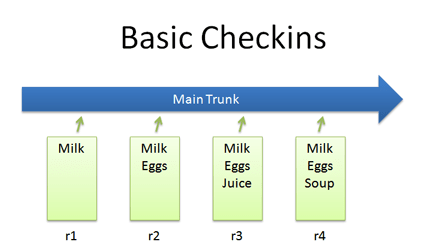
- The simplest scenario is by checking in a file and modifying it over time
- Each time we check in a new version, we get a new revision(r1, r2, r3, etc.)
2. Checkouts and Editing
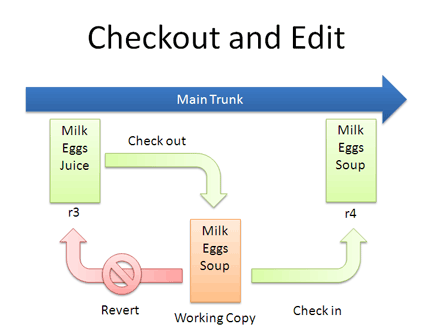
- In reality, you might not keep checking in a file. You may have to checkout, edit, and checkin. The cycle looks like the figure above
- If you don’t like your changes and want to start over, you can revert to the previous version and start again (or stop). When checking out, you get the latest revision by default. If you want, you can specify a particular revision.
3. Diffs
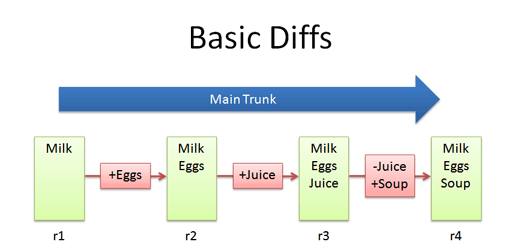
- The trunk has a history of changes as a file evolves. Think of it as the main file. Diffs are the changes you made while editing: imagine you can “peel” them off and apply them to a file as shown above.
- For example, to go from r1 to r2, we add eggs (+Eggs). Imagine peeling off that red sticker and placing it on r1, to get r2.
- And, to get from r2 to r3, we add Juice (+Juice). To get from r3 to r4, we remove Juice and add Soup (-Juice, +Soup).
- Most version control systems store diffs rather than full copies of the file. This saves disk space: 4 revisions doesn’t mean we have 4 copies; we have 1 copy and 4 small diffs. Pretty nifty right?
- Now that we have that, what is the diff from r1 to r4?……………. Notice how “Juice” wasn’t even involved – the direct jump from r1 to r4 doesn’t need that change, since Juice was overridden by Soup.
4. Branching
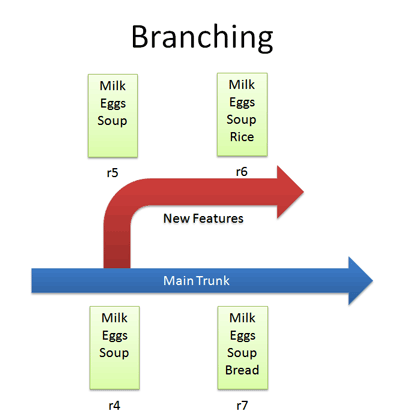
- Branches let us copy code into a separate folder so we can toy around with it separately.
- For example, we can create a branch for new, experimental ideas for our list: crazy things like Rice, or Eggs, or waffles. Depending on the version control system, creating a branch may change the revision number.
- Now that we have a branch, we can change our code and work out the kinks. (“Hmmm… waffles? I don’t know what the boss will thin. Rice is a safe bet.”) Since we’re in a separate branch, we can make changes and test in isolation, knowing that our changes wont hurt anyone. and our branch history is under version control.
- So branching isn’t too tough of a concept: Pretend you copied your code into a different directory. You’ve probably branched your code in shool projects, making sure you have a “fail safe” version you can return to if things blow up.
5. Merging
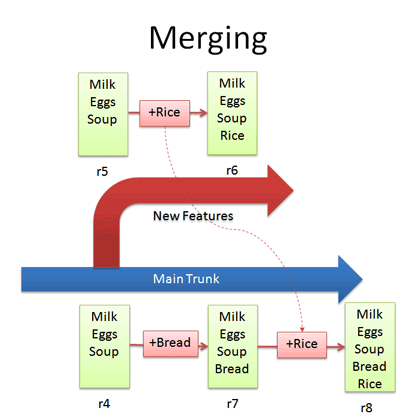
- Branching sounds simple, right? Well, It’s not – figuring how to merge changes from one branch to another can be tricky.
- Let’s say we want to get the “Rice” feature from our experimental branch into the mainline. How would we do this? Diff r6 and r7 and apply that to the main line?Wrongo. We only want to apply the changes that happened in the branch! That means, we diff r5 and r6 and apply that to the main trunk.
- If we diffed r6 and r7, we would lose the “Bread” feature that was in main. This is a subtle point – imagine “peeling off” the changes from the experimental branch (+Rice) and adding that to main. Main may have had other changes, which is ok – we just want to insert the Rice feature.
- But what if we add (+Rice) in the diff between r4 and r7? which (+Rice) will be added to r8? will it be from the diff between r4 and r7? or the diff between r5 and r6? This is where “Conflicts” come into picture. We want to avoid conflicts as much as possible. To avoid conflicts, always get the latest version from the trunk before merging it to the main branch. With this, we will be adding the diff between the branch and the latest version of the trunk.
6. Conflicts
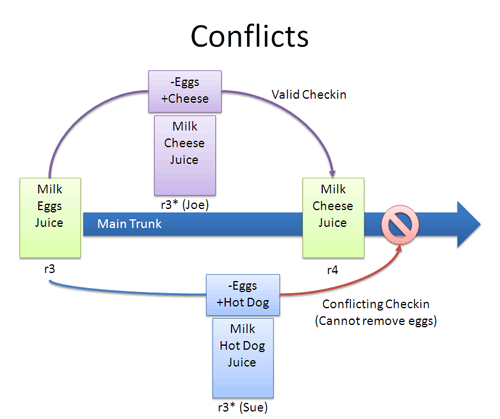
- Now, this is the tricky part. As we’ve mentioned before, conflicts really can occur. But no worries! we can resolve it and remove that conflict
- Many times, the VCS can automatically merge changes to different parts of a file. Conflicts can arise when changes appear that don’t work together: Joe wants to remove eggs and replace it with cheese (-eggs, +cheese), and Sue wants to replace eggs with a hot dog (-eggs, +hot dog).
- At this point, it’s a race: if Joe checks in first, that’s the change that goes through (and Sue can’t make her change).
- When changes overlap and contradict like this, the VCS may report a conflict and not let your check in – it’s up to you to check in a newer version that resolves this dilemma. A few approaches you might want to consider:Re-apply your changes. Sync to the latest version (r4) and re-apply your changes to this file: Add hot dog to the list that already has cheese.
Override their changes with yours. Check out the latest version (r4), copy over your version, and check your version in. In effect, this removes cheese and replace it with hot dog. - Conflicts are infrequent but can be a pain. Usually, I update to the latest and re-apply my changes.
7. Tagging
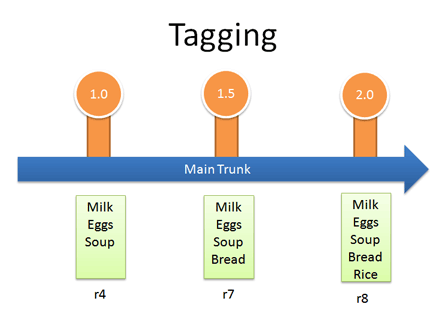
- Many VCSS can let you tag (label) any revision for easy reference. This way you can refer to “Release 1.0” instead of a particular build number.
Real-life example: Managing Windows Source Code
We guessed that Windows was managed out of a shared folder, but it’s not the case. So, how’s it done?
- There is a main line with stable builds of Windows.
- Each group (Networking, User Interface, Media Player, etc.) has its own branch to develop new features. These are under development and less stable than main
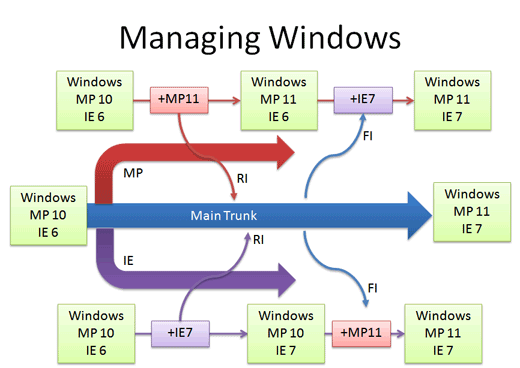
You develop new features in your branch and “Reverse Integrate (RI)” to get them into Main. Later, you “Forward Integrate” and to get the latest changes from Main into your branch.
Let’s say we’re at Media Player 10 and IE 6. The Media Player team makes version 11 in their own branch. When it’s ready and tested, there’s a patch from 10 – 11 which is applied to Main (just like the “Rice” example, but a tad more complicated). This a reverse integration, from the branch to the trunk. The IE team can do the same thing.
Later, the Media Player team can pick up the latest code from other teams, like IE. In this case, Media Player forward integrates and gets the latest patches from main into their branch. This is like pulling in the “Bread” feature into the experimental branch, but again, more complicated.
In reality, there’s many layers of branches and sub-branches, along with quality metrics that determine when you get to RI. But you get the idea: branches help manage complexity. Now you know the basics of how one of the largest software projects is organized.
References:

 Exatron